
The original site: regexlearn
Test
If you can answer these, you don’t need to go through this course:
- What is this
^\w+\.pdf$? - How to select the year in Release 10/9/2021?
Learn
Character Sets (All, numbers, alphabets, negations)
- we can directly search for the string of characters verbatim, we are looking for
- the period (dot)
.is for selecting any kind of character, including special chars and spaces (full stop for any character) - we can use character sets
[abc]. This basically meansc[au]twill selectcatandcut. The alternative characters,aoruwill be checked with each possibility.b[aeiou]rselects all ofbar,ber…,buretc
- we can use negated character sets
[^abc]to ensure that our selections will not haveaandbandcin that particular spotb[^eo]rselectsbar,birandbur
- we can use alphanumeric range (based on ASCII),
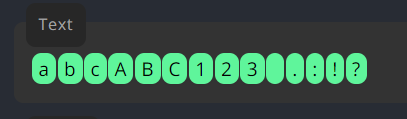
[a-z]or[0-9][e-o]selects all alphabetsefghijklmno[3-6]selects3456
Repetition
-
these are placed after the characters
-
+: 0 or 1(+) timesbe*r→br,ber,beeretc
-
*: 1(+) timesbe+r→ber,beer(notbr, doesn’t get selected)
-
?: optional (single) charactercolou?r→colorandcolour(uis optional)
-
{n}to show how many times, the character it entails should repeatbe{2}r→beer
-
{n,}at least times.be{2,}r→beer,beeer,beeer
-
{n,m}at least times and at most times.be{1,3}r→ber,beer,beeer
-
[0-9]{4}selects the year in10/9/2004
Grouping and Piping
This is where things get fun (and complex!)
- Parenthesis:
(abc)to groupabc - We can reference an already mentioned group by writing
\nwhere can be any integer, e.g.\1,\2etc(ha)-\1,(haa)-\2: is equivalent to writing(ha)-(ha),(haa)-(haa)- so,
\1references(ha)and\2references(haa)
- Non-Capturing Grouping:
(?:)to ensure that it is not captured by references.- In the previous example,
(?:ha)-(haa)-\1-\1gives,(ha)-(haa)-(haa)-(haa) - notice how
(ha)is avoided from being referenced due to that(?:)syntax.
- In the previous example,
- Pipe Character
|(c|r)at|dogselectscat,ratanddot.- Compare it with
[abc]that operates at a character level, the|character operates at an expression level
Escape and special sequences
- Escape Character
\ - Caret Sign:
^Selecting the line start- Dollar Sign:
$Selecting by end of the line
- Dollar Sign:
- Word Character
\w: Any letter, number and underscore- Except Word Character
\W: Except letters, numbers and underscore
- Except Word Character
- Digits:
\d(only numbers)- Except Digits:
\D(except numbers)
- Except Digits:
- Space:
\sonly spaces- Except Space:
\Sonly spaces
- Except Space:
Lookarounds
- Positive Lookahead
(?=)\d+(?=PM)looks for the number3in the expressionDate: 4 Aug 3PM- the digit follows PM immediately
- Negative Lookahead
(?!)1\d+(?!PM)looks for the number4in the expressionDate: 4 Aug 3PM
- Positive Lookbehind
(?<=)(?<=\$)\d+looks for the number5in the expression `Product Code: 1064 Price: $5
- Negative Lookbehind
(?<!)(?<!\$)\d+looks for the number1064in the expression `Product Code: 1064 Price: $5
Flags
- a.k.a. modifiers determine whether typed expressions
- treat text as separate lines
- are case sensitive
- find all matches
- global flag:
/<your regex expression>/g- select all matches, (if not, then only the first one)
- multiline flag:
/<rgx>/m- regex sees all text as one line
- enabling this flag, makes regex respect the newlines
- makes the
$point to the last char of the first line /<rgx>/gmwill select all in each line
- case insensitive flag:
/<rgx>/i- don’t worry about case bro
Concept
- greedy matching: matchmaking will be as long as possible
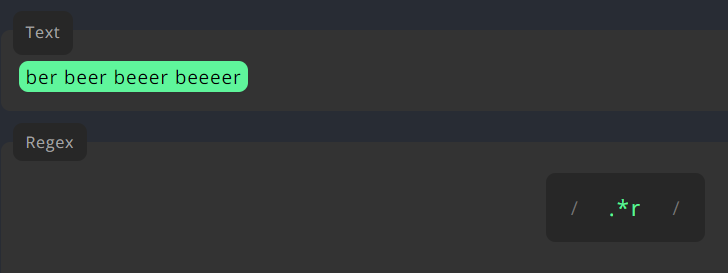 Doesn’t stop at
 ber… goes tillbeeeer
- lazy matching: stops at the first matching
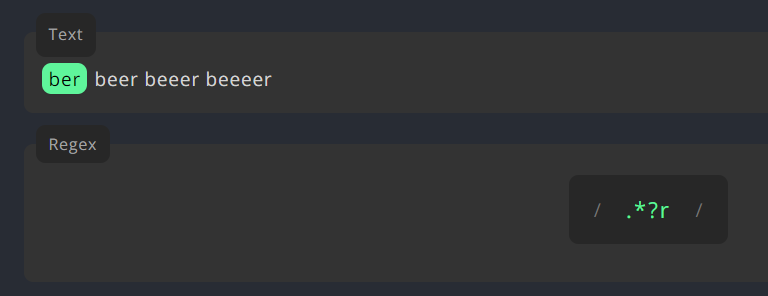 Stops at
 ber. lazy chico
Done!

Footnotes
-
instead of
=in positive lookahead, we put the negation symbol!↩